
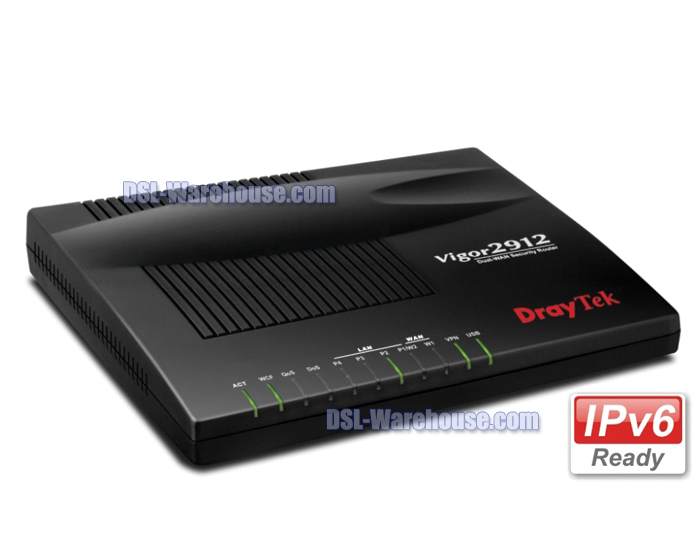
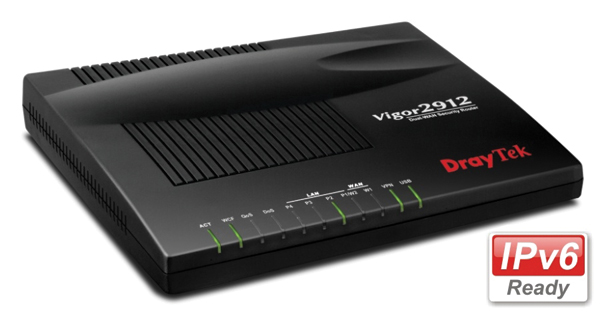
Description
DrayTek Vigor 2912 FEATURES
- Dual WAN load-balance and redundancy (broadband)
- USB 2.0 port as WAN 3 (3G/4G USB mobile broadband)
- Object-based firewall with Web Content Filtering
- Bandwidth management with intelligent VoIP Qos
- 16 VPN tunnels with VPN failover (backup)
- TR-069 Central Management via the VigorACS SI
- Support IPv6 and IPv4 networks
- Smart Monitor Traffic Analyzer (Up to 30 nodes)
The Vigor2912 was designed for small office applications that helps your businesses achieve the goals of business growth, innovation and responsiveness. The DrayTek Vigor 2912s' dual WAN load-balance and redundancy ensures your office stays connected. Your network security is protected by robust firewall and Web Content Filtering (optional / license required). All of your subscribed bandwidth can be easily allocated to the essential applications (e.g. VoIP) by utilizing the advanced QoS settings. The VPN tunnels cover the needs of the inter-office / remote access via multiple protocols. The secure Wi-Fi network enables the office environment ready for the trend of BYOD (Bring Your Own Device) to enhance the productivity. At last but not least, the Vigor2912 Series supports the IPv6 for the seamless migration.
NOTE: This product does not incorporate a built-in modem. To use this product you will need either a Cable Modem or DSL Ethernet Modem.
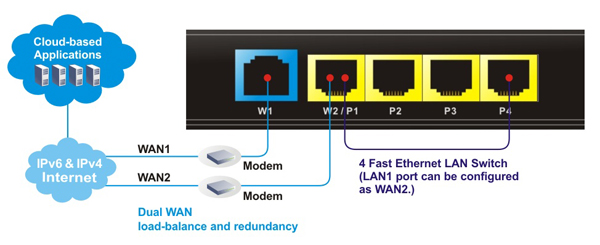
Dual WAN load-balance and redundancy
The Vigor 2912 offers two fast Ethernet WAN interface ports (LAN port 1 can be configured as WAN 2.). You have the flexibility to choose different Internet feeds based on the local High Speed Internet plan offered by the ISP and utilize multiple connections via dual WAN load-balance and redundancy. Enabling both WAN 1 and WAN 2, 2 WANs share Internet traffic requirements of your organization (load-balance). During downtime, you will always have an access to the Internet even if one of the WAN fails (redundancy).
DrayTek Vigor 2912 Dual WAN
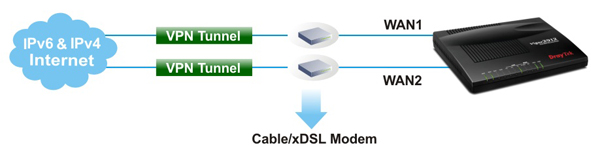
VPN for Secure Inter-Office / Remote Access
The Vigor 2912 supports up to 16 LAN-to-LAN VPN tunnels secure remote data access, such as inter-office, or home-office communication with multi-protocols: PPTP /IPSec/L2P/L2TP over IPSec.
Its advanced AES/DES/3DES encryption and IKE Authentication provides you with strong security. The dual WAN feature can not only allow you to run load-balancing but also backup. If the main VPN fails, the second VPN takes over.
DrayTek Vigor 2912 VPN Secure Inter Office / Remote Access
USB 2.0 port for 3G/4G LTE mobile, FTP Drive and Network Printers
The USB port can be used for the connection of 3G/4G mobile broadband dongle as the USB WAN (WAN 3). The USB WAN interface can also be the primary access if the local fixed line service hasn’t been deployed yet. Another two popular applications are the FTP drive and network printers for the office.

DrayTek Vigor 2912 3G Application Figure
Object-based Firewall with Web Content Filtering
The Vigor 2912 supports Object-based SPI firewall to set of Call/Data Filters and DoS/DDoS prevention. You can use pre-defined objects or groups for IP, service type, keyword, file extensions, etc., and mix these with the Time Scheduler or the VLAN groups as required. The Web Content Filter (optional), powered by the Commtouch Web WCF of Content Security Management (CSM) eases configurations to prevent access to inappropriate sites. The IM/P2P/Protocol filter and URL Content Filter are also available in CSM. Your network security is fully managed by the Vigor 2912.

DrayTek Vigor 2912 Object-based Firewall
Bandwidth Management with Intelligent VoIP QoS
Small offices normally choose the affordable Internet plans in lieu of increasing cost for bandwidth over 100Mbps. Hence, how to reserve and prioritize bandwidth for the essential applications is critical to operation. The Vigor 2912 includes VoIP QoS to guarantee the priority for VoIP calls automatically once a VoIP call is detected. In addition to QoS, you can manage the bandwidth consumption of every employee based on the individual IP via Session Limit and Bandwidth Limit. The Smart Bandwidth Limit allows you to only set bandwidth reservation for PCs operated essential tasks. Other PCs have the session limitation to prevent the inappropriate usages (e.g. P2P download). Once exceeding the limitation, their speed rates will be downgrade to your customized numbers. You can guarantee all subscribed bandwidth to have proper usage.
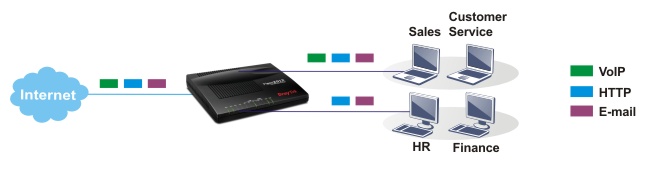
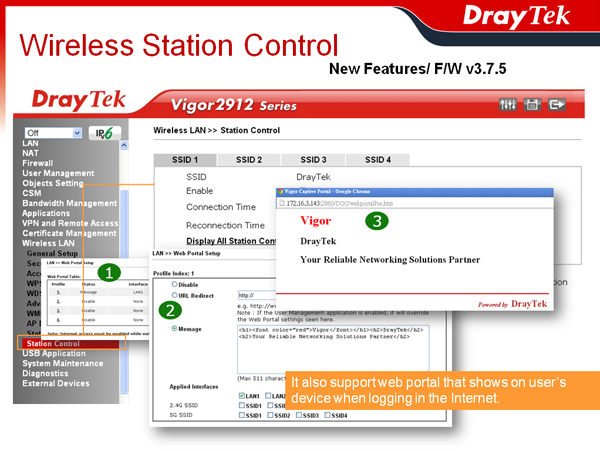
DrayTek Vigor 2912 Bandwidth Management
DrayTek Vigor 2912 Specifications
WAN Feature
Ethernet
- IPv4- DHCP Client, Static IP, PPPoE, PPTP, L2TP, 802.1p/q Multi-VLAN Tagging
- IPv6- Tunnel Mode: PPP, TSPC, AICCU, 6in4, 6rd
Dual Stack:DHCPv6 Client, Static IPv6, DSLite* - USB WAN
- PPP
- Outbound Policy-based Load-balance
- WAN Connection Failover
- 30,000 NAT Sessions
Firewall
- Multi-NAT, DMZ Host, Port-Redirection and Open Port
- Object-based Firewall
- MAC Address Filter
- SPI (Stateful Packet Inspection) (Flow Track)
- DoS/DDoS Prevention
- IP Address Anti-spoofing
- E-mail Alert and Logging via SysLog
- Bind IP to MAC Address
- Time Schedule Control
- IPv6 Firewall
- User Management
VPN
- Up to 16 VPN Tunnels
- Protocol : PPTP, IPSec, L2TP, L2TP over IPSec
- Encryption : MPPE and Hardware-based AES/DES/3DES
- Authentication : MD5, SHA-1
- IKE Authentication : Pre-shared key and Digital Signature (X.509)
- LAN-to-LAN, Host-to-LAN
- IPsec NAT-traversal (NAT-T)
- Dead Peer Detection (DPD)
- VPN Backup Mode
- DHCP over IPSec
- VPN Pass-through
- VPN Wizard
- mOTP
USB
- Printer Sharing
- File Sharing:
- Support FAT32 File System
- Support FTP Function for File Sharing
- Support Samba for File Sharing
- 3.5G (HSDPA)/4G (LTE)* as WAN3
Bandwidth Management
- QoS :
- Guarantee Bandwidth for VoIP (VoIP QoS)
- Class-based Bandwidth Guarantee by User-defined Traffic Categories
- DiffServ Code Point Classifying
- 4-level Priority for Each Direction (Inbound/Outbound)
- Bandwidth Borrowed
- Bandwidth/Session Limitation
- Layer-3 (TOS/DSCP) QoS Mapping
- Smart Bandwidth Limitation (Triggered by Traffic/Session)
Network Management
- Web-based User Interface (HTTP/HTTPS)
- Quick Start Wizard
- CLI (Command Line Interface, Telnet/SSH)
- Administration Access Control
- Configuration Backup/Restore
- Built-in Diagnostic Function
- Firmware Upgrade via TFTP/FTP/HTTP/TR-069
- Logging via SysLog
- SNMP V2/V3
- Management Session Time Out
- Two-level Management (Admin/User Mode)
- External Device
- TR-069
- Support Smart Monitor (Up to 30 PCs)
Content Security Management
- IM/P2P Application
- URL Content Filter :
- URL Keyword Blocking (White List and Black List)
- Java Applet, Cookies, Active X, Compressed, Executable, Multimedia File Blocking
- Excepting Subnets
- GlobalView Web Content Filter (Powered by commtouch)
Network Features
- DHCP Client/Relay/Server
- RADVD for IPv6
- DHCPv6 Server
- Static IPv6 Address Configuration
- IGMP Proxy V2/V3
- IGMP Snooping
- Dynamic DNS
- NTP Client
- RADIUS Client
- DNS Cache/Proxy
- UPnP 30 Sessions
- Routing Protocol:
- Static Routing
- RIP V2
- VLAN Tagging(802.1q) on LAN*
|
Interface of Vigor2912
|
||||
|
Hardware Interface |
1 x 10/100 Base-TX WAN, RJ45, Configurable WAN2 on P1 | |||
| 4 x 10/100 Base-TX LAN, RJ45 | ||||
| 1 x USB Host 2.0 (for Printer/3G USB Modem/USB Disk) | ||||
| 1 x Factory Reset Button | ||||
| 1 x Wireless On/Off/ WPS Button | ||||
|
Temperature
|
Operating : 0°C ~ 45°C | |||
| Storage : -25°C ~ 70°C | ||||
| Humidity | 10% ~ 90% (non-condensing) | |||
| Max. Power | 10 Watt | |||
| Dimension | L220 * W160 * H36 (mm) | |||
| Power | DC 12V /1A | |||
 (Opens in a New Window)
ORDERING INFORMATION
| Model Name | Description |
| Vigor2912 | Dual WAN Broadband Security Router w/Firewall |

Reviews
There are no reviews yet.